
What Is Order Fulfillment? The Complete Process, Explained
Order fulfillment is the chain of documents and status changes that turns a paid order into a parcel someone has signed for. It runs from the moment payment clears to the moment a delivery scan lands — not from the pick to the dock.
Most explanations describe it as three verbs: pick, pack, ship. That is the warehouse's view, and it is not much use when an order goes missing. The version you can actually audit is narrower: six documents, six states, six handovers. Each handover has an owner, a timestamp, and a way to fail.
Here is the whole chain, document by document, with the failure that shows up at each step.
What order fulfillment actually covers
Two things travel through the process at once. The physical one is stock moving from a shelf into a box and onto a truck. The informational one is a record moving from paid to delivered, and it is the record that customers, accountants and carriers argue about.
Fulfillment is done when both arrive. A parcel on a porch with no delivery scan is not finished — you cannot close the order, you cannot start the return clock, and if the customer files a chargeback you have nothing to show.
That is why the document trail matters more than speed. Speed decides whether a customer is annoyed. Documents decide whether you can prove anything.
The six documents that move an order
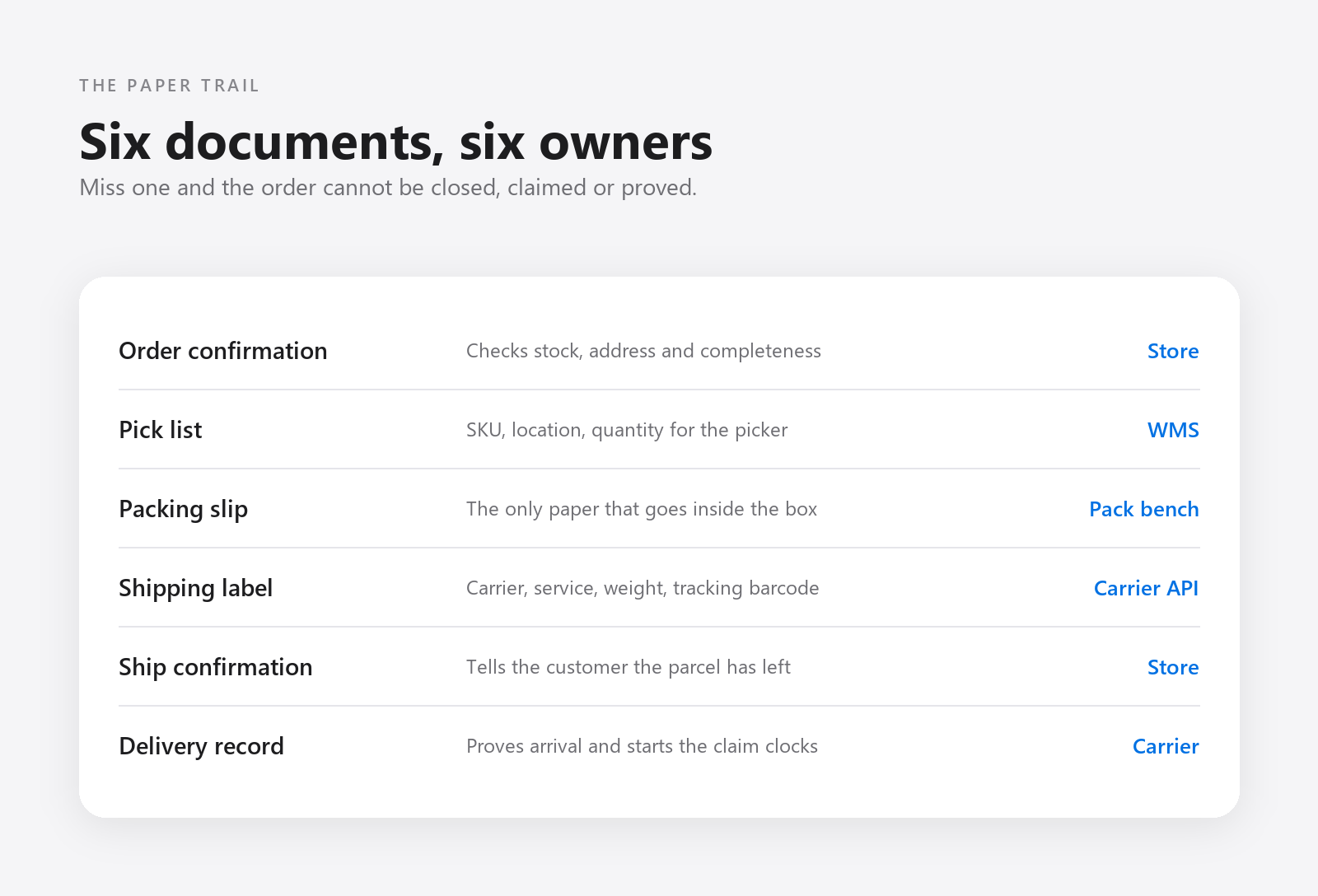
Every fulfillment system, from a spreadsheet to a full WMS, produces the same six artifacts. Names differ; the job does not.
| Document | Created by | The question it answers | How it usually breaks |
|---|---|---|---|
| Order confirmation | Storefront or OMS | Is this order valid? | Address autocomplete drops an apartment number |
| Pick list | WMS or warehouse sheet | What do I take, and from where? | Stock count is wrong, so the slot is empty |
| Packing slip | Pack bench | What is actually inside this box? | A free Build Branded Gift is left out; slip A lands in box B |
| Shipping label | Label software or carrier API | Who carries it, on what service? | Wrong service level; a re-weigh moves the rate band |
| Shipping confirmation | Storefront or OMS | Does the customer know it left? | Label printed, order marked shipped, parcel still on the bench |
| Delivery record | Carrier | Did it arrive, and who took it? | No signature or scan, so a claim has no evidence |
Read the table left to right and you have the process. Read the right-hand column top to bottom and you have the list of things that generate support tickets. Almost every "where is my order" email traces back to one of those six rows.
Order confirmation and the pick list
An order entering the system is not an order ready to pick. Something has to check three things first: is there stock, is the address deliverable, is the record complete.
In overseas warehouse practice this step is called order review, and it is where the majority of rework is caught before it costs anything. An address with no unit number, a PO box for a carrier that will not deliver to one, an order for a SKU that shows two units when the shelf has one — all of these are cheap to fix at review and expensive to fix after picking.
Only approved orders generate a pick list. Three fields make or break that document: SKU, location, quantity. The location column is the difference between a new hire who is productive in three days and one who spends a month memorising aisle numbers. A pick list sorted by location lets someone walk a route instead of hunting; a pick list sorted by order number makes every picker reinvent the route.
Mature warehouses add a second layer here — a unique barcode per item, a quantity check, a weight check, and camera coverage on the pack bench. That sounds like equipment shopping. It is to What Really one decision: stop letting human eyes make the final call. Warehouses that do this report picking error rates under 0.3%, which is roughly three wrong items in a thousand.
The packing slip, and the five-gram gate
The packing slip is the only document that goes inside the box. No prices, usually; order number, items, quantities, sometimes a batch or expiry code. Its real job appears weeks later, when something comes back and you need to match the contents to the order.
The paper does not stop errors. The Gifts That Scale behind the pack bench does.
Good operations pre-load a weight for every SKU, every bundle, and every free gift into the system, then weigh each finished parcel. Deviations above five grams trigger an alert. Five grams is about the weight of a sheet of A4 paper, so this will not catch a missing card. It will catch a missing accessory, a doubled gift, or two near-identical SKUs swapped at the shelf — which is where most wrong-item complaints actually come from.
Then comes the outbound scan: the carrier label barcode and the order barcode are matched before the label will print. If they disagree, no label. This one rule exists for a single failure mode — A's goods with B's address on the box — and it is worth the extra two seconds because that failure costs you two customers at once, not one reship.
A shipping label is not a shipment
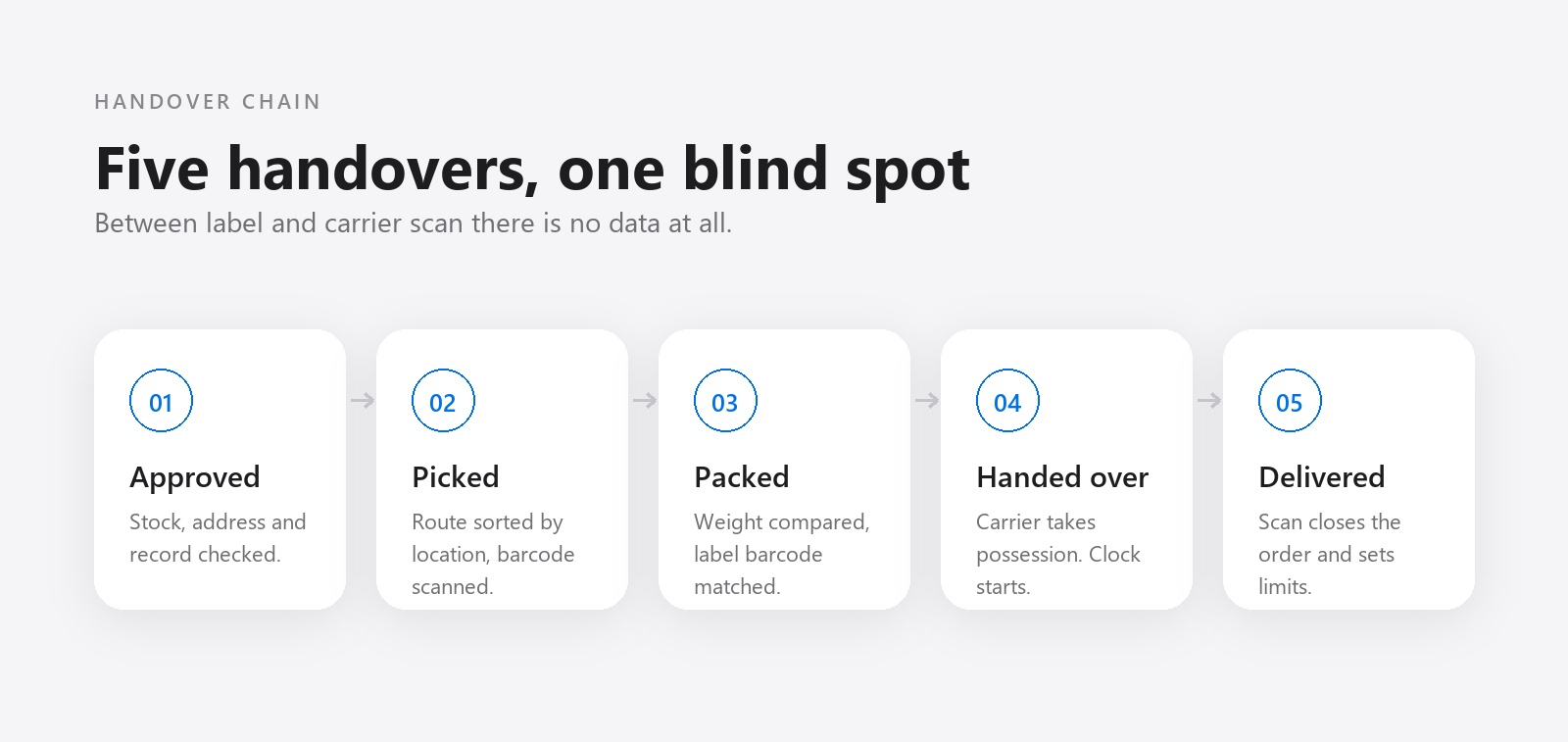
This is the sentence most process guides skip. Printing a label does not mean a carrier has the parcel.
USPS states it plainly. The status Shipping Label Created, USPS Awaiting Item means a label exists with a tracking number and the package has not been given to USPS yet. Possession only begins at USPS In Possession of Item. Between those two scans there is a gap with no data in it — and that gap is exactly where "it shipped three days ago and hasn't moved" complaints are born.
A label has to carry the carrier and service level, the weight, the destination and the tracking barcode. Pallet and carton-level shipments add one more thing: a unique identifier for the logistic unit, the SSCC, so a whole pallet can be scanned as one object at a hub instead of carton by carton.
Two quiet cost drivers live on this document. Service level chosen wrong is a straight loss you never see itemised. Weight is the other: a carton that grows slightly in each dimension can cross into a higher billing band, and the re-weigh happens after you have already quoted the customer.
Shipping confirmation and the delivery record
The shipping confirmation is the message that tells the customer the parcel is on its way. It is also the point where responsibility shifts, which is why the timing of it is regulated in the US.
Under the FTC's Mail, Internet, or Telephone Order Merchandise Rule, a seller that has not stated a shipping time must have a reasonable basis to ship within 30 days of receiving a properly completed order. If it cannot, it has to notify the buyer and offer to cancel with a full refund. Posting a note on an order-status page usually does not count as notice — the rule expects the customer to actually receive it.
The delivery record closes the chain, and it is the one most often left dangling. It sets three clocks: the claims window, the return window, and the point at which the order can be reported as complete. Warehouses whose order status stops at "shipped" and never moves again are usually missing the carrier's delivery feed, not the delivery itself.
Where the hours actually go
Very little of a parcel's handling time is spent picking. Once orders are batched and routed by location, the physical pick is a matter of seconds. The hours go into travel, searching, re-checking, and waiting for a carrier cut-off.
That changes what a warehouse manager should optimise. Fast-moving SKUs belong in a forward pick area close to the pack benches, and those slots should turn over at least three times a day; anything that has not moved in seven days gets pushed out of the prime space. Before a peak, demand is forecast about a week ahead, and during the peak the numbers that get refreshed every two hours are units sold, stock left, and the carrier's actual collection capacity — not the total square footage of the building.
The other hard constraint is the cut-off. "Same-day dispatch" is not an attitude, it is a scheduling rule: orders approved before a set time join today's wave, everything after joins tomorrow's. Before you put that promise on a product page, check that the carrier's pickup time is later than your cut-off. Plenty of operations hit their own deadline and then sit on sealed bags until the next morning.
What you can hand over, and what you can't
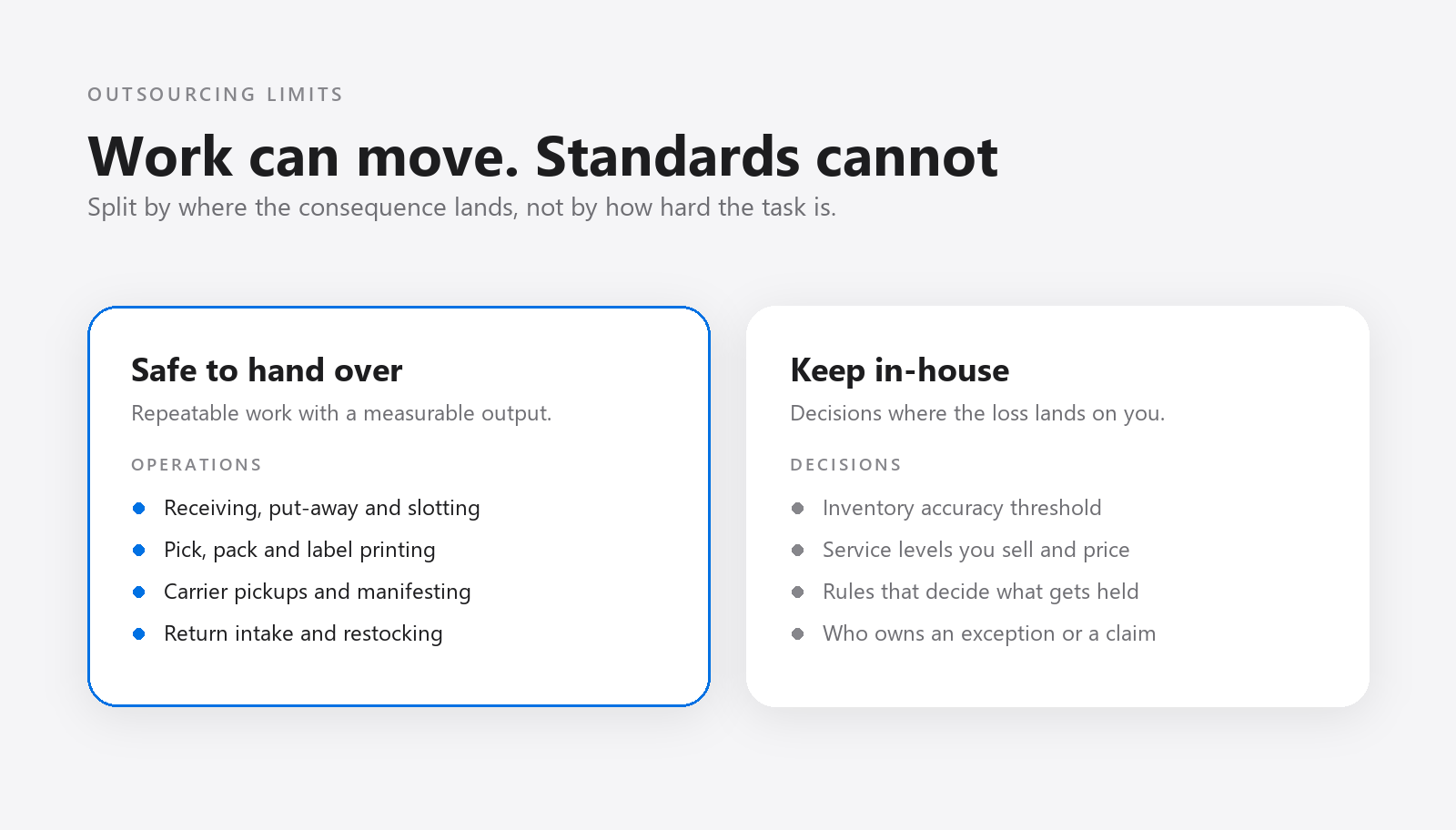
Fulfillment outsourcing is usually framed as all or nothing. The useful split is by decision, not by task.
| Step | Can be outsourced | Must stay with you |
|---|---|---|
| Receiving and put-away | Yes | How receiving discrepancies are judged |
| Pick and pack | Yes | The inventory accuracy threshold you accept |
| Labels and carriers | Yes | Which service levels you sell, and at what price |
| Address checks | Partly | The rules that decide what gets held |
| Exceptions and claims | Partly | Who decides "this was the warehouse's fault" |
| Customer communication | No | All of it |
The test is not whether a step is hard. It is where the consequence lands when the step fails. If the consequence lands on you, the work can move but the standard and the sign-off cannot.
Five signals the process is already failing
None of these require a customer complaint. Each maps to a field you can query today.
- Pick lists routinely send people to empty slots. Your stock count has drifted; you just have not reconciled it yet.
- The pack bench stops weighing parcels during busy hours. The five-gram gate exists on paper only.
- A batch of tracking numbers shows no carrier scan after three days. Labels were printed, parcels were not handed over.
- Support gets repeat "wrong colour" complaints on one SKU. Two variants are sitting too close together, or sharing a barcode.
- Delivery scans come back for less than nine orders in ten. Claims and returns are running on guesswork.
The short version
Order fulfillment is not difficult because picking is difficult. It is difficult because six handovers happen before a customer touches the box, and each one is a chance to lose the thread. Build the six documents, put a scale and a barcode match at the pack bench, and treat the label as a promise rather than proof.
If you are deciding which steps to keep in-house, send us your monthly order count, SKU count and warehouse location — we will come back with a split before we talk about pricing.
References (Neutral Third-Party Sources)
- Shopify Help Center — Understanding your order statuses: how fulfilment status is labelled at item level, including partially fulfilled. https://help.shopify.com/en/manual/orders/manage-orders/order-status
- Shopify Help Center — Fulfilling orders: what self-fulfilment involves (pick, pack, buy a label, hand to a carrier) and how a fulfilment service differs. https://help.shopify.com/en/manual/fulfillment/fulfilling-orders
- WooCommerce — Order Statuses: processing means paid and awaiting fulfilment; completed must be set manually after dispatch. https://woocommerce.com/document/managing-orders/order-statuses
- Amazon Selling Partner API — searchOrders: the definitions of pending, unshipped, partially shipped and shipped used across seller systems. https://developer-docs.amazon.com/sp-api/reference/searchorders
- USPS — Where is my package? Tracking Status Help:
Shipping Label Created, USPS Awaiting Itemmeans the package has not been given to USPS. https://faq.usps.com/articles/Knowledge/Where-is-my-package - GS1 — Serial Shipping Container Code (SSCC): the identifier that lets a pallet or carton move as one logistic unit. https://www.gs1.org/standards/id-keys/sscc
- Federal Trade Commission — Mail, Internet, or Telephone Order Merchandise Rule: the 30-day shipping baseline and the obligation to notify buyers of delay. https://www.ftc.gov/business-guidance/resources/business-guide-ftcs-mail-internet-or-telephone-order-merchandise-rule